EN 303 645 - The Practical Guide for Connected Product Teams

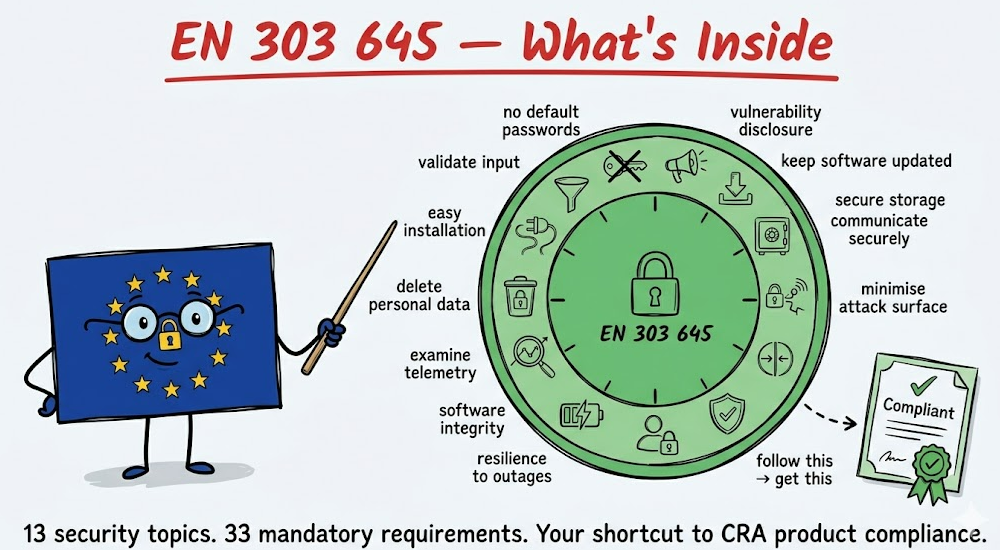
If your product connects to a network and ends up in someone's home or hand, this is probably the standard you need. EN 303 645 is the harmonised standard for consumer IoT security under the CRA. Follow it, and you get presumption of conformity - which means self-assessment is enough, even for Class I products.
What is EN 303 645?
ETSI EN 303 645 is a European standard that defines cybersecurity requirements for consumer IoT products. It's now the primary, recognized by EU (harmonised) standard referenced by the CRA for consumer-grade connected products.
It covers: smart home devices, wearables, connected toys, consumer appliances, health monitors, smart speakers, cameras, door locks - anything with a network interface that ends up with a consumer.
It does NOT cover: industrial automation (that's IEC 62443), medical devices (MDR), automotive (UN R155/R156), or enterprise infrastructure.
The standard is built around 13 security topics (like passwords, updates, encryption) plus one group covering data protection. Within those topics there are 68 specific requirements - 33 you must meet, 35 that are recommended but not required.
Why it matters for CRA compliance
If your connected product is Default or Important Class I, following EN 303 645 gives you a significant advantage:
- Default products: self-assessment is always allowed, but EN 303 645 gives you a structured framework to work instead interpreting CRA.
- Class I products: following a harmonised standard like EN 303 645 lets you self-assess. Without it, you need a third-party audit.
In other words: EN 303 645 is your shortcut to the easier conformity assessment path.
The 13 topics - what they actually mean
1. No universal default passwords
Every device must have a unique password, or require the user to set one during setup. No "admin/admin." No shared factory passwords across devices.
This applies to ALL password-based authentication - not just cloud or web interfaces. That includes:
- cloud dashboard and API login
- device web interface
- SSH or serial console access on the device
- BLE pairing credentials
- any local shell access (if your device runs Linux, the root password counts)
What this looks like in practice:
- unique per-device credentials generated during manufacturing
- generation method must resist brute force (not sequential, not pattern-based)
- users must be able to change passwords easily
- brute-force protection on all network-facing interfaces (lockout, rate limiting)
For your team: this affects manufacturing (unique credential provisioning), firmware (password change mechanism), and your network stack (brute-force mitigation). It's not just a software change. And don't forget local access - a device with SSH enabled and a shared root password fails this provision even if the cloud side is perfect.
2. Implement a vulnerability disclosure policy
You must publish a public vulnerability disclosure policy. Anyone who finds a security issue in your product needs to know where to report it and what to expect.
What this looks like in practice:
- a security.txt on your website, or a dedicated security contact page
- published response timeline (e.g. "we acknowledge within 48 hours")
- a process behind it - who receives the report, who triages, who fixes
For your team: this is a process, not a feature. Someone in your organisation needs to own vulnerability intake. Under the CRA, reported vulnerabilities also trigger potential CSIRT reporting obligations.
3 - Keep software updated
All non-immutable software must be securely updateable. Updates must be cryptographically signed. Users must be notified. A support period must be published.
What this looks like in practice:
- OTA update mechanism with signature verification
- update server infrastructure (or cloud service)
- user notification (push notification, dashboard alert, device LED)
- published end-of-support date - visible to the buyer at time of purchase
- ability to roll back if an update fails
For your team: this is often the biggest engineering investment. If your device doesn't have OTA today, this is a significant firmware and infrastructure project. The CRA requires updates for at least 5 years - budget accordingly.
4. Securely store sensitive security parameters
Private keys, credentials, tokens - anything sensitive must be stored securely. No hard-coded credentials in source code. Hardware-backed storage where possible.
What this looks like in practice:
- secure element or TPM for key storage on the device
- no credentials in firmware binaries (common in early prototypes that ship to production)
- encrypted credential storage if hardware secure storage isn't available
- key rotation capability
For your team: review your firmware for hard-coded secrets. Check if your manufacturing process provisions credentials securely or copies the same key to every device.
5. Communicate securely
All external communication must use state-of-the-art encryption. Connections must be authenticated. No plaintext transmission of sensitive data.
What this looks like in practice:
- TLS 1.2+ for all cloud communication (TLS 1.3 preferred)
- mTLS for device-to-cloud authentication where feasible
- certificate pinning or trust chain validation
- no HTTP fallback - if TLS fails, the connection fails
For your team: check your full communication path. Device to gateway, gateway to cloud, cloud to dashboard, dashboard to user. Every hop needs encryption. Pay attention to local network communication too - device-to-device on the same Wi-Fi is still a network interface.
6. Minimise exposed attack surface
Disable everything you don't need. Unused ports, unused services, debug interfaces, development tools left in production firmware.
What this looks like in practice:
- disable UART/JTAG debug ports in production builds
- close unused network ports (scan your own device)
- remove development tools, test endpoints, verbose logging from production firmware
- run every process with minimum necessary privileges (not root)
- disable Bluetooth if you only used it during development
For your team: this is where a firmware audit pays off. Scan your production device from the network. List every open port, every running service. If you can't explain why it needs to be there - close it.
7. Ensure software integrity
Secure boot: verify firmware integrity at startup. If something has been tampered with, the device should detect it and alert.
What this looks like in practice:
- hardware root of trust (secure boot chain from bootloader to application)
- signed firmware images verified before execution
- if integrity check fails: refuse to boot, or boot into recovery mode and alert
- protection against firmware downgrade attacks
For your team: if your microcontroller supports secure boot (most modern ones do - ESP32, STM32, nRF), enable it. If you're not using it yet, this requires bootloader changes and a key management process for firmware signing.
8. Ensure personal data is protected
Personal data must be encrypted. Users must know what data is collected and why. Data protection by design from the start.
What this looks like in practice:
- encrypt personal data at rest on the device and in the cloud
- privacy notice accessible to the user (in-app, on the device, or on product page)
- document what personal data you process and your legal basis
For your team: start by listing exactly what data your device collects. You might be surprised - location data from Wi-Fi SSIDs, usage patterns, timestamps that reveal daily routines. If it's personal data under GDPR, it needs protection.
9. Make systems resilient to outages
The device must work locally when the cloud is down. After a power loss, it must recover cleanly.
What this looks like in practice:
- core functionality works offline (a smart lock must still lock/unlock without internet)
- graceful handling of cloud disconnection (buffer data locally, reconnect automatically)
- clean recovery after power loss (no corrupted state, no factory reset)
For your team: test your device with the internet cable unplugged. If it becomes a brick - that's a compliance issue, not just a UX problem.
10. Examine system telemetry data (optional)
If you collect telemetry, monitor it for security anomalies. This is a recommended provision, not mandatory - but under CRA it strengthens your vulnerability monitoring capability.
What this looks like in practice:
- log analysis on your cloud backend for unusual patterns (unexpected firmware versions, abnormal data volumes, connections from unexpected regions)
- baseline what "normal" looks like so you can detect "abnormal"
For your team: if you already have device telemetry (and most IoT products do), add basic anomaly detection. It doesn't need to be AI - simple threshold alerts on connection patterns and data volumes go a long way.
11. Make it easy for users to delete personal data
Users must be able to erase their data - both on the device and in your cloud backend.
What this looks like in practice:
- factory reset on the device that actually wipes stored data (not just settings)
- account deletion in the app/dashboard that removes cloud-stored data
- data deletion must be complete - not just "hidden from the user"
For your team: test your factory reset. Does it really wipe credentials, usage logs, personal data? Or does it just reset settings while the flash retains everything?
12. Make installation and maintenance easy
Default setup must result in a secure state. Users shouldn't have to make security decisions during setup to be safe.
What this looks like in practice:
- first-time setup wizard that enforces password change
- encryption and secure communication enabled by default (not "turn on in settings")
- security-relevant settings clearly labelled and documented
For your team: walk through your setup flow as a non-technical user. If skipping every optional step leaves the device insecure - that's a compliance issue.
13. Validate input data
All input - from users, from the network, from APIs - must be validated. Malformed data must not crash or manipulate the device.
What this looks like in practice:
- input validation on all external interfaces (MQTT messages, HTTP requests, BLE commands, serial input)
- buffer overflow protection
- reject unexpected data types, sizes, and formats
- fuzz testing during development
For your team: if you haven't fuzz-tested your device's network interfaces, start there. A surprising number of IoT devices crash on malformed packets.
Data protection provisions
Beyond the 13 cybersecurity provisions, EN 303 645 includes a data protection section that aligns with GDPR:
- Transparency - inform users what data you collect and why
- Consent - if you need consent, make it genuinely informed
- Data minimisation - collect only what you need
- Proper handling - follow data protection law throughout the data lifecycle
These are not CRA requirements - they're GDPR alignment. But since your product almost certainly processes personal data, you need to handle both tracks in parallel.
And GDPR is not the only regulation here. The EU Data Act (2023/2854, applicable from September 2025) adds obligations specifically relevant to connected products:
- User access to device-generated data - users must be able to access data their device generates, easily and for free
- Data portability - users can share their data with third parties. You can't design the product to make this difficult
- Restrictions on manufacturer use - you can't use data generated by the user's device for purposes they didn't agree to
EN 303 645 Section 6 covers the basics (transparency, consent, minimisation). GDPR goes deeper on personal data rights. The Data Act goes further still on device-generated data access and portability. For connected product teams, all three apply in parallel - Section 6 is the thinnest layer of the three.
How to test?
EN 303 645 defines WHAT to do. The companion standard ETSI TS 103 701 defines HOW to test it. It provides test cases for each provision - what to check, how to verify, and what constitutes a pass or fail.
If you're doing self-assessment, TS 103 701 gives you a structured test plan instead of inventing your own.
Is EN 303 645 sufficent?
In the first blog post we described three pillars of CRA compliance:
- Your product - secure by design, tested, documented
- Your organisation - capable of handling vulnerabilities, managing suppliers, maintaining security
- Your processes - continuous, not one-off
EN 303 645 covers Pillar 1 . But it doesn't cover 100%, and it barely touches Pillars 2 and 3.
The gaps in Pillar 1:
- Data minimisation - the CRA treats it as a cybersecurity requirement. You need to address it explicitly.
- Impact on other devices - the CRA says your product must not negatively affect other devices on the network. EN 303 645 focuses on the device itself, not its neighbours.
- Incident impact reduction - the CRA says design to reduce impact when something goes wrong. EN 303 645 touches this through 6 (attack surface) and 7 (integrity) but doesn't address it as a standalone requirement.
What's missing entirely (Pillars 2 and 3):
- CSIRT reporting within 24 hours (Article 14)
- SBOM creation and maintenance (Annex I, Part II)
- Coordinated vulnerability disclosure process beyond just publishing a policy
- Security updates for at least 5 years with patches available for 10
- Ongoing conformity - keeping the risk assessment and documentation alive throughout the support period
EN 303 645 provision 5.2 says "publish a disclosure policy." The CRA says "report to authorities within 24 hours, maintain an SBOM, keep patches available for 10 years, notify users of vulnerabilities."
Summary
Follow EN 303 645 for your product security. Then fill the gaps directly against the CRA text for the remaining Pillar 1 items, and address Pillars 2 and 3 separately. "Follow EN 303 645" is not the same as "CRA compliant" - but it gets you most of the way on the product side.
Further reading
EN 303 645 - requirements document
ETSI TS 103 701 - how to test
What it takes to be CRA compliant - article about other requirements for CRA
As a Chief Information Officer with over a decade of experience as a C# developer, I approach my work with a passion for technology and a belief that the best solutions come from understanding diverse perspectives. This mindset shapes how I lead—whether in my career, family, or personal life—balancing innovation with practicality. My wife and two kids inspire everything I do, guiding me to create harmony and meaningful outcomes by blending different ideas with empathy and insight.
Rapidly adapt our competences into your IoT solution
Contact us and share your challenges
