How-to7 min read
How to use GPT Image 2.6 in business apps: Sunburst vs Flare
You want generated images inside a business app, and OpenAI now offers two GPT Image 2.6 models with the same price and different strengths. Sunburst is for detailed work and precise edits, Flare for fast iteration. Both run through the Image API and add a complexity setting and markup-guided edits, plus SVG and GIF output. Start with Flare where response time matters and with Sunburst where every detail has to be right, then test both on your own prompts.
What changed in GPT Image 2.6
OpenAI released Sunburst and Flare on November 4, 2026 as gpt-image-2.6-sunburst and gpt-image-2.6-flare. The image generation guide lists three additions:
complexity(low,medium,high) sets how much the model plans before it renders. The default ishigh, and there is no separate fee for it. A higher setting helps with dense text and layouts, but it can add latency and changes you did not ask for.- Markup-guided edits: you send a transparent PNG with circles or sketches as
markupon an edit. It must be the same size as the first input image. - SVG and animated GIF output, on the generations endpoint only.
Sunburst vs Flare vs GPT Image 2 and 2.5
| 2.6 Sunburst | 2.6 Flare | 2.5 Sunburst / Flare | GPT Image 2 | |
|---|---|---|---|---|
| Positioned for | Detailed work, precise edits | Fast iteration | Sunburst: editing precision. Flare: fast everyday generation | Fast, high-quality generation and editing |
| API | Image API only | Image API only | Image API and Responses API image tool | Image API |
| Batch | Not supported | Not supported | Supported (Sunburst page) | Supported |
quality |
auto to max |
auto to max |
auto to max |
low, medium, high, auto |
complexity |
Yes | Yes | Not listed | Rejected with a 400 error in our test |
Sources: the Sunburst, Flare, 2.5 Sunburst and GPT Image 2 model pages and the prompting guide.
Both 2.6 pages list the same token rates: $5 per 1M text input tokens, $8 per 1M image input tokens and $30 per 1M image output tokens. There is no official per-image price, so measure cost per accepted image on your own workload. That matters for bulk jobs, because 2.6 has no Batch: the 2.5 Sunburst page lists Batch image output at $15 per 1M tokens, against $30 standard.
Step by step: adding GPT Image 2.6 to an app
- Pick one job. Product cutouts on a transparent background, marketing variants, documentation diagrams, translated infographics or interface previews. The prompting guide has examples for most of them.
- Pick the starting model. The prompting guide recommends Flare when response time matters most and Sunburst when detail, layout or edit accuracy is demanding. If GPT Image 2 already gives you acceptable quality, or you use 2.5 Flare, test 2.6 Flare first. If you use 2.5 Sunburst, test 2.6 Sunburst.
- Set the parameters.
quality:auto,low,medium,high,xhigh,max.size:auto,1024x1024,1536x1024,1024x1536or a custom size in multiples of 16, aspect ratio 1:3 to 3:1.background: transparentneeds PNG or WebP.output_format:png,jpeg,webp, plussvgandgifon generations. On edits, omitinput_fidelity. - Generate an image.
OpenAI()reads the key fromOPENAI_API_KEY, so it stays out of your code. The response includes ausageobject with text input, image input and output tokens.
import base64
from pathlib import Path

from openai import OpenAI

client = OpenAI()  # reads OPENAI_API_KEY from the environment

result = client.images.generate(
    model="gpt-image-2.6-flare",
    prompt="A clean product photo of a steel thermos on a white table, soft daylight, no text, no logos.",
    size="1536x1024",
    quality="medium",
    output_format="jpeg",
    complexity="medium",  # 2.6 models only, gpt-image-2 rejects it
)
Path("thermos.jpg").write_bytes(base64.b64decode(result.data[0].b64_json))
print(result.usage)- Edit with reference photos. Pass a list of reference photos to
images.editand say what must change and what must stay. In our tests, two reference photos gave better likeness than one.
LIKENESS = (
    "Use both reference photos of the same person as identity guides only. "
    "Preserve the person's likeness. Do NOT copy the expression or head angle "
    "from the references, invent a new expression and pose as described. "
    "Photorealistic."
)
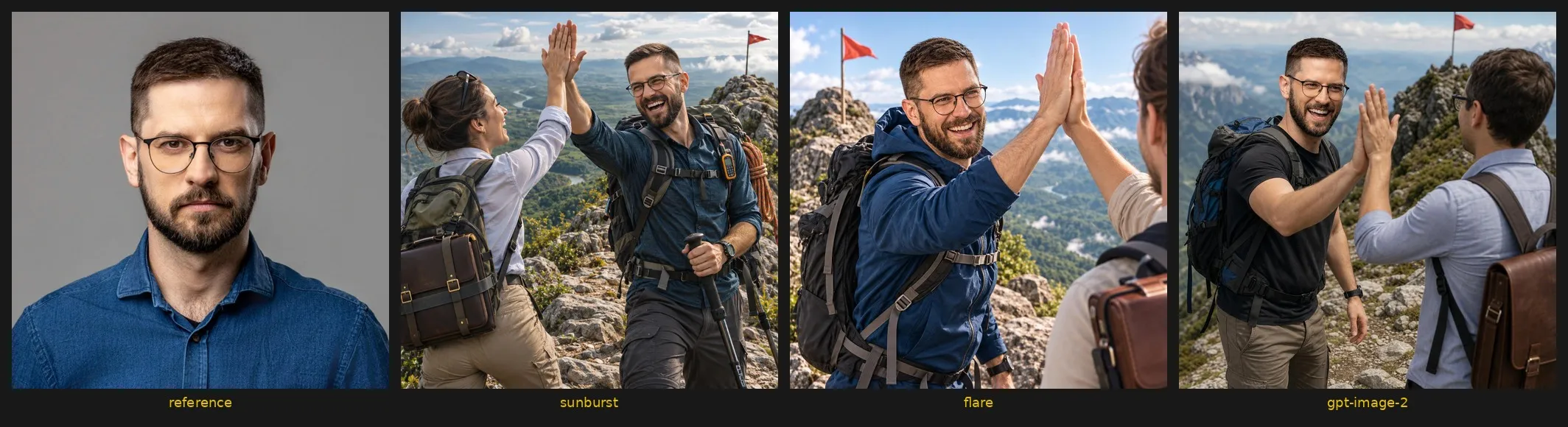
PROMPT = (
    f"{LIKENESS} The person is a mountain guide on a rocky trail near a summit with "
    "a small flag, green valleys below, laughing, head turned three-quarters to "
    "camera, giving a client a high five. Fun, casual, confident mood. "
    "No text, no words, no logos."
)

with open("reference.jpg", "rb") as ref1, open("reference2.jpg", "rb") as ref2:
    result = client.images.edit(
        model="gpt-image-2.6-sunburst",
        image=[ref1, ref2],
        prompt=PROMPT,
        size="1024x1024",
        quality="medium",
        output_format="jpeg",
        complexity="medium",
    )
Path("mountain-sunburst.jpg").write_bytes(base64.b64decode(result.data[0].b64_json))- Compare models on your own input. Same prompt, same reference photos, fixed
size,qualityand format.complexitygoes only to the 2.6 models, because GPT Image 2 rejects it.
import time

MODELS = ["gpt-image-2.6-sunburst", "gpt-image-2.6-flare", "gpt-image-2"]

for model in MODELS:
    params = dict(model=model, prompt=PROMPT, size="1024x1024", quality="medium", output_format="jpeg")
    if model != "gpt-image-2":
        params["complexity"] = "medium"  # gpt-image-2 rejects this field with a 400 error

    start = time.perf_counter()
    with open("reference.jpg", "rb") as ref1, open("reference2.jpg", "rb") as ref2:
        result = client.images.edit(image=[ref1, ref2], **params)
    elapsed = time.perf_counter() - start
    Path(f"mountain-{model}.jpg").write_bytes(base64.b64decode(result.data[0].b64_json))

    usage = result.usage
    text_in = usage.input_tokens_details.text_tokens
    image_in = usage.input_tokens_details.image_tokens
    # USD per 1M tokens: text in $5, image in $8, image out $30
    cost = (text_in * 5 + image_in * 8 + usage.output_tokens * 30) / 1_000_000
    print(f"{model}: {elapsed:.1f} s, tokens {text_in}/{image_in}/{usage.output_tokens}, ${cost:.4f}")
Results from one test run
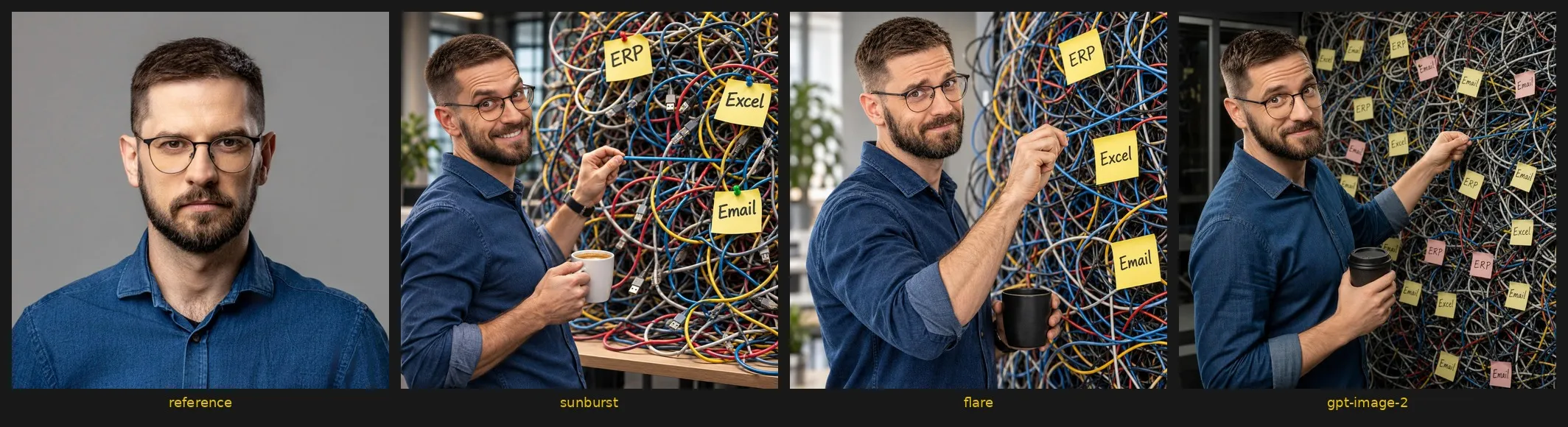
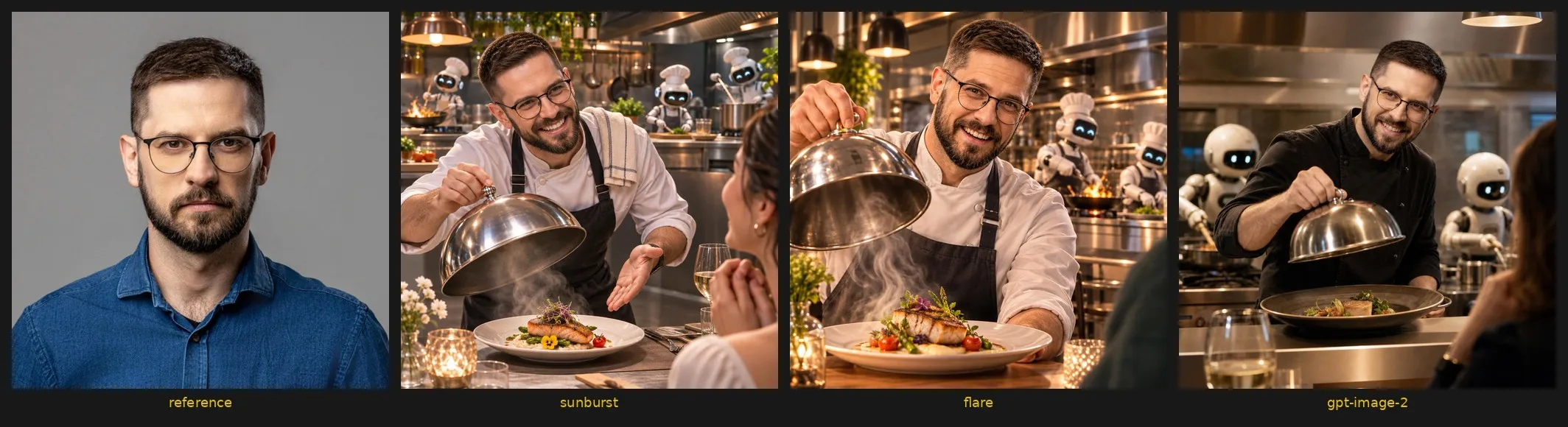
Three scenes (a mountain guide, someone untangling cables and sticky notes, a chef serving a dish), two reference photos, one run per model and scene, 1024x1024, quality medium, complexity="medium" on 2.6 only. Times cover the successful call only. Cost is token usage times the published rates; GPT Image 2 is estimated at the same rates, because its model page shows no price.
| Model | Mountain | Chaos | Chef | Cost from tokens |
|---|---|---|---|---|
gpt-image-2.6-sunburst |
22.9 s | 25.3 s | 22.3 s | $0.0646-0.0647 |
gpt-image-2.6-flare |
11.2 s | 15.1 s | 9.6 s | $0.0646-0.0647 |
gpt-image-2 |
41.7 s | 40.9 s | 38.8 s | $0.0737-0.0738 (estimated) |
Tokens per call: about 160-172 text input on 2.6 and 140-152 on GPT Image 2, 2,545 image input on all, and 1,449 output on 2.6 against 1,756 on GPT Image 2.
- Roll out one workflow at a time. OpenAI advises moving a small share of traffic first. Then track response time, failures, retries and cost per accepted image.
Common mistakes
- Planning a bulk job on Batch. 2.6 does not support it, so compare the cost against 2.5 or GPT Image 2 first.
- Calling 2.6 through the Responses API. It is not supported there. Use
v1/images/generationsandv1/images/edits. - Sending 2.6 requests unchanged to GPT Image 2. Its quality scale stops at
high, and it rejectscomplexity. - Skipping the text check. OpenAI lists text placement among the known limitations, next to latency of up to 2 minutes for complex prompts. Read every label before an image goes out.
- Sending photos you may not process. Photos of people and client documents are personal or confidential data. If they must stay inside your network, see preparing documents for private AI.
Conclusions
- Flare for speed. Roughly twice as fast as Sunburst in every scene, at exactly the same cost. Use it for covers, variants and quick iteration inside an app.
- Sunburst for people and precise edits. It held likeness and detail best. When a face or a product has to look right, the extra 10-13 seconds are worth it.
- Little reason to stay on GPT Image 2. It was the slowest, about 14% more expensive at the same token rates, and it has no
complexity. The exception is a bulk job that depends on Batch, which 2.6 does not support. - Draft in Flare, finalise in Sunburst. You iterate quickly and wait longer only for the version that ships.
- Ask for likeness, not an identical face. In earlier attempts, prompts that demanded an “identical face” froze the expression. What worked much better: asking for likeness only, describing a new emotion and head angle for each scene, and adding a second reference photo.
One run per model and scene is not a benchmark. Repeat the comparison on your own inputs.
Next step
Pick one image job in your app, collect 10-20 real inputs and run them through the comparison loop with Sunburst and Flare. Keep the model that meets your quality bar at a response time and cost per accepted image you can live with.
If you want this built into a working application, talk to Rebels Software. We build custom applications, private AI and AI agents, and an image step is often one part of a longer process, as described in how to choose the first process for an AI agent. We start with a Discovery workshop, test one case as a PoC on your real data, deploy it and keep it running under Rebels Care. Book a call on this page.