Applications6 min read
What GPT Image 2.6 changes for business apps
If your app generates or edits images, or you plan to add a step like that, a new model release raises the same two questions every time: should you switch, and to which model? OpenAI released GPT Image 2.6 on November 4, 2026 as two models: Sunburst for detailed work and precise edits, and Flare for fast iteration. I read through the docs and we ran a small comparison with two reference photos the same day. My short answer: try Flare first in most business flows, and pay for Sunburst’s slower response when the output has to match the input exactly.
What is actually new
Three things stand out in the image generation guide:
- A
complexitysetting (low,medium,high) that controls how much the model plans before rendering. The default ishigh, and changing it costs nothing extra. OpenAI suggests lower values for focused edits, such as changing a background or a sign, and higher ones for dense text and complex layouts. It also warns that higher complexity can add latency and unwanted changes, so test the levels on your own task before you pick one. - Markup-guided edits. You draw circles or sketches on a transparent PNG and send it as
markupwith the edit. For anyone who has tried to describe “move the logo a bit to the left” in words, this is the most useful change for real product work. It also works on 2.5. - SVG and animated GIF output on the generations endpoint. That covers icons and small animations without a separate conversion step.
There are also limits worth knowing before you plan anything. Both Sunburst and Flare work only through the Image API generation and edit endpoints. The Responses API and Batch are not supported. Both have the same token rates: $5 per 1M text input tokens, $8 per 1M image input tokens and $30 per 1M image output tokens. There is no official per-image price.
Sunburst vs Flare in one test
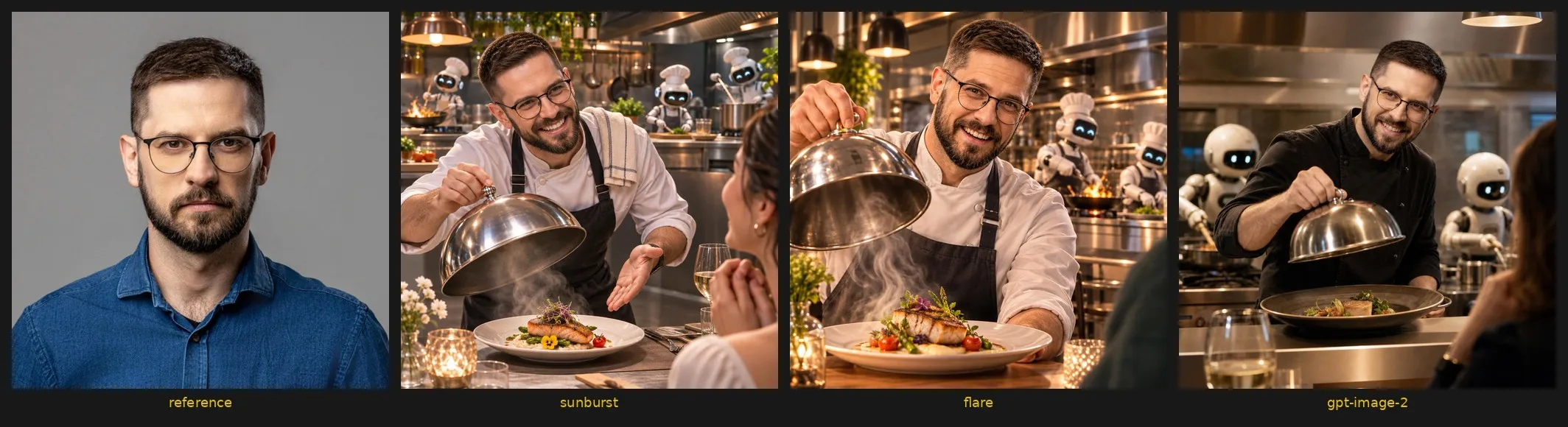
We ran three scenes (a mountain guide, someone untangling a mess of cables, a chef serving a dish) on Sunburst, Flare and GPT Image 2. Each scene used two reference photos and the same prompt for every model, at 1024x1024, quality medium, and complexity="medium" on 2.6 only, because GPT Image 2 rejects it. That is one run per model and scene, so read it as a first look. A benchmark would need many more runs.
| Model | Response time, three scenes | Cost from tokens per image |
|---|---|---|
| Sunburst | 22.3-25.3 s | $0.0646-0.0647 |
| Flare | 9.6-15.1 s | $0.0646-0.0647 |
| GPT Image 2 | 38.8-41.7 s | $0.0737-0.0738 (estimated) |
Cost is token usage multiplied by the published rates. GPT Image 2 is estimated at the same rates, since its model page lists no price.
What I take from it:
- Flare was about twice as fast as Sunburst at exactly the same cost. Good for covers, variants and fast iteration.
- Sunburst held likeness and detail best. That is the one for people and precise edits.
- GPT Image 2 was the slowest and about 14% more expensive, and it has no
complexity. Unless you depend on Batch, I see little reason to stay on it. - Draft in Flare, finalise in Sunburst.
- Don’t ask for an “identical face”. In our earlier attempts it froze the expression. Ask for likeness, give each scene an emotion and an angle, and add a second reference photo.
Why it matters for business apps
Most image features I see in business software fall into two groups. The first is interactive: a preview in a configurator, a marketing variant in a CMS, a draft illustration for a document. There, waiting 10-15 seconds instead of about 40 changes how the feature feels, and small drift is often fine. Flare fits that.
The second is anything where the result has to stay true to the source: a product photo for a catalogue, a person’s photo, a technical drawing. Drift there means a person has to catch it and redo the work. That is where I would pay the extra seconds for Sunburst.
Two caveats from the docs. Text in images is still listed as a known limitation, and complex prompts can take up to 2 minutes. And because 2.6 has no Batch, a large overnight catalogue job may still be cheaper on 2.5 or GPT Image 2, where Batch is available. The 2.5 Sunburst page lists image output at $15 per 1M tokens with Batch, against $30 standard.
What to check before an image step goes live
A model call is the easy part. Most of the work in a real application sits around it, and the image generation guide answers several of these questions if you read past the examples.
Markup has rules
The annotation layer must be a separate transparent PNG with the same width and height as the first input image, and you cannot combine markup with mask. If users draw on an image in your interface, export their strokes as their own layer at the original size. Do not flatten them onto the photo.
SVG and GIF are generation only
The edit endpoint returns neither. SVG needs n set to 1 and does not stream. A GIF takes frame_count (2-64, default 9) and frame_duration_ms (20-2000, default 200). If your feature is “edit this icon”, plan a fresh generation with a good prompt instead of an edit.
Consistency across images is still a known limit
OpenAI says the models may struggle to keep recurring characters or brand elements consistent across generations. For a series of marketing images with the same mascot, or a catalogue in one visual style, put a person in the loop who approves each image before it is published.
Plan for blocked requests
Some failures come back with the type image_generation_user_error, for example with the code moderation_blocked. The docs say not to retry those automatically without changing the prompt or the input. Show the user a plain message and log the details for your team.
Identify your end users
If the feature serves individual users, OpenAI recommends sending a stable safety_identifier with each request, a hash of the username or email address rather than the address itself. It takes one line of code.
Treat input photos as data
A photo of an employee or a scan of a client document is personal or confidential data, and it leaves your network with every call. Decide which inputs may go to an external API at all, the same way you would for documents in private AI search.
Where I would start
Pick one image step in your app, collect 10-20 real inputs and run them through both 2.6 models. The response includes a usage object, so you can track cost per accepted image from day one. Count rejected images too: a cheap image that someone has to redo is not cheap. Store the prompt version with every call, so after a change you know what you are comparing. The code and parameters are in our guide on how to use GPT Image 2.6 in business apps.
If you want to talk through where an image step like this fits in your app, we can look at it together.